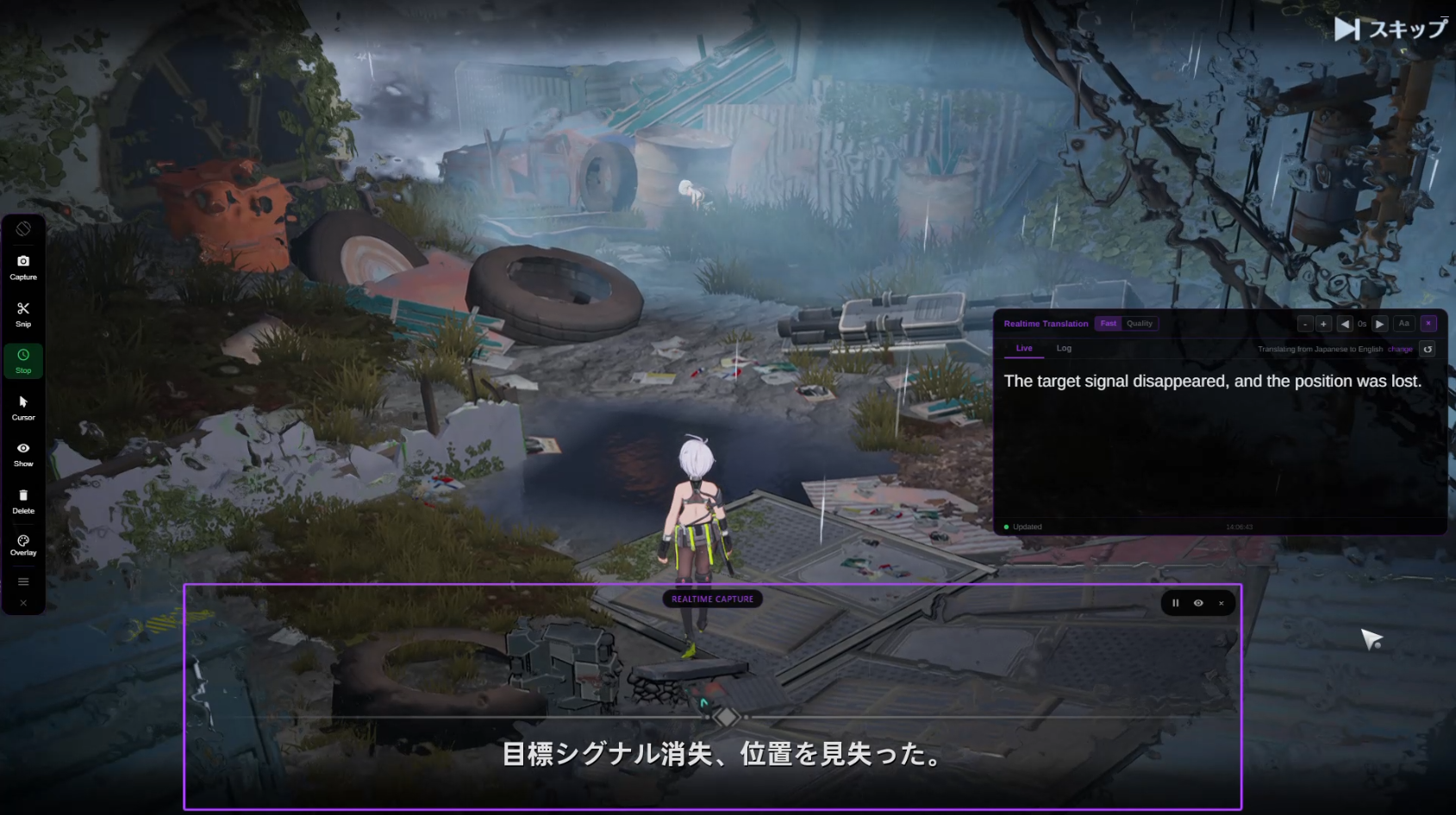
LIVE · translating on screen

Break Language
Barriers

Translate your screen locally. Improve difficult text when needed. Lexa keeps up with games, visual novels, videos, and apps in real time.

Free·Windows 10 & 11·20+ languages
USE CASES

Built for Most Scenarios

Whether you're gaming, watching videos, or working with foreign software, Lexa has the perfect mode for your needs.

Lexa Translator screen translation example: Most early released MMOs / RPGs
Best for this:
Cursor mode, Realtime mode, Snapshot mode

Most early released MMOs / RPGs

Play new gaming brands even when released only in local countries like Korea, Japan, or China.

Result
Understand storylines, dialogue, and game menus instantly.
Cursor modeRealtime modeSnapshot mode
Learn how to translate game text
Lexa Translator screen translation example: Visual novel games
Best for this:
Cursor mode, Realtime mode

Visual novel games

Understand stories even when they aren't translated into your native language.

Result
Understand storylines and dialogue.
Cursor modeRealtime mode
Explore visual novel translation
Lexa Translator screen translation example: Cutscenes
Best for this:
Realtime mode

Cutscenes

Sometimes there's no time to translate cutscenes — they move too fast. Lexa keeps up in real time.

Result
Understand storylines and dialogue.
Realtime mode
FIVE MODES

Choose Your Mode

Five distinct modes, each engineered for a different scenario — from one-shot captures to continuous live translation.

Snapshot Mode

Translate all visible text in one shot

WHEN TO USE
Perfect for multiple separate texts and static content.
  • Capture entire window
  • Automatic text detection and translation
  • Overlay translation on top of original
  • Great for game menus & complex layouts

Snipping Mode

Focus on specific static areas

WHEN TO USE
Best for specific pieces of text when you need a fast, focused translation.
  • Select exactly the area you want to translate
  • Clean overlay inside the selected region
  • Ideal for subtitles and small UI elements
  • Precision control for better accuracy

Cursor Mode

Lightweight, continuous translation for specific areas

WHEN TO USE
Great for quick checks while working or gaming, without interrupting your flow.
  • Activate instantly with a hotkey
  • Seamless translation without blocking the target window
  • Clean modal display (no overlays)
  • Doesn't interrupt your current task

Realtime Mode

Continuous Live Translation

WHEN TO USE
Ideal for games with changing dialogue and streaming videos.
  • Continuously monitors selected area
  • Live translation window with history
  • Adjustable capture region
  • Never miss a line of dialogue

Write Mode

Translate the text you write without breaking your flow

WHEN TO USE
Best for translating messages, replies, and short text while you work.
  • Translate text as you type
  • Works with messages, replies, and short text
  • No need to switch apps or copy-paste
  • Keeps your writing flow uninterrupted
40% Off Launch Offer

Plans

Start free. Go Pro when you need unlimited translation.

Free is great for trying Lexa and occasional use. Pro unlocks unlimited screen translations, Realtime, and 300 Write Mode translations per month.

Free

Try Lexa with local-first screen translation, daily Realtime, Lexa Improvements, and Write Mode each month.

$0/month
  • 30 screen translations/day
  • 30 min/day of Realtime
  • 10 Lexa Improvements/month
  • 30 Write Mode translations/month
  • Local-first translation included

No credit card required

Best for daily use 40% Off

Pro

Unlimited screen translations and Realtime, 300 Lexa Improvements/month, and 300 Write Mode translations/month.

$8.33Save 40%
$4.99/month

Limited-time launch pricing

  • Unlimited screen translations
  • Unlimited Realtime
  • 300 Lexa Improvements/month
  • 300 Write Mode translations/month

Cancel anytime

Secure payment via Stripe Cancel anytime

Trusted by a growing community

900+
Users
1M+
Translations
20+
Languages Used
GALLERY

See It in Action

Real examples of Lexa Translator working across games and applications.

Lexa Translator snapshot mode overlaying translated dialogue on a visual novel game screen

Visual Novel Translation

Translate visual novel dialogue in real time with Lexa Translator

Lexa Translator log tab, showing the history option so you don't lose any text.

Don't lose any text

Never lose any text with Lexa Translator log tab

Lexa Translator translating game quest objectives and UI elements with overlay customization

Follow every line

Translate everything on the screen with Lexa Translator

Lexa Translator overlay with customized colors and opacity settings for comfortable reading

Custom Styling

Personalize overlay colors and opacity to match your preference

Lexa Translator language selection showing multiple source and target language options

Multi-Language Support

Seamlessly switch between different source and target languages

Lexa Translator realtime capture mode showing continuous translation with live and log tabs

Real-time Capture

Continuous translation display with live and log tabs

WHO IT'S FOR

Perfect For

Real-time translation built for gaming — from story-driven experiences to fast-paced gameplay.

Gaming

Perfect for visual novels, RPGs, and games in Japanese, Chinese, or Korean.

Reading

Easily translate in-game text, dialogue logs, and digital reading content.

Video Content

Understand gameplay videos, walkthroughs, and recorded footage.

Live Streaming

Follow streams in any language with real-time translation support.

System Compatibility

Windows Desktop

Compatible with Windows 10 and Windows 11, optimized for all desktop environments

Multi-Monitor Support

Seamlessly works across multiple displays, perfect for extended gaming setups

High DPI Ready

Full support for 4K, 1440p, and high DPI scaling with crystal-clear text recognition

Fast & Lightweight

Minimal CPU and memory usage, won't impact gaming performance or system resources

No File Modification

Non-invasive screen-based translation, no game files modified, no ban risk

FAQ

Frequently Asked Questions

Everything you need to know about Lexa Translator.

Lexa Translator is a Windows desktop application that translates on-screen text in real time. It works with games, videos, and any application without modifying the original software.
Lexa captures text directly from your screen and translates it on your device by default. Snapshot, Snipping, Cursor, and Realtime let you choose the flow that fits what you are reading.
Yes. Lexa works with any application that displays text on screen, including games, visual novels, browsers, videos, and desktop software.
No. Lexa runs independently and does not modify any game or application files.
Yes. Realtime translation is built for live sessions where text keeps moving and you want low-latency results.
Lexa supports multiple source and target languages, including Japanese, Chinese, Korean, English, and many others.
Yes. Free includes 30 screen translations per day, 30 minutes of Realtime per day, 10 Lexa Improvements per month, and 30 Write Mode translations per month. Pro unlocks unlimited screen translations, unlimited Realtime, 300 Lexa Improvements per month, and 300 Write Mode translations per month.
Write Mode helps you translate text you write, such as messages, replies, and short text, without interrupting your workflow.
Free includes 30 Write Mode translations per month. Pro includes 300 Write Mode translations per month.
Yes. Lexa does not modify external applications and runs independently on your system.
CONTACT

Contact Us

Need help or have a question about Lexa Translator? We're here to help.

Get in touch

We typically respond within 24–48 hours.

What can we help with?

  • Technical support
  • Bug reports
  • Billing questions
  • Feature requests
  • Business inquiries

Before contacting us

You may find your answer faster in our documentation or FAQ.

About Lexa

Lexa Translator is a Windows desktop application designed for real-time screen translation.

For more details, please review our Privacy Policy.

Send us a message

Get Started Today

Download Lexa Translator for Windows and start translating any on-screen content instantly

One-click installation
No technical knowledge required
Instant updates
Free to try
Lightweight and fast
Professional support

Instantly. Seamlessly. Professionally.

Transform any window into a fully translatable experience.