Textractor vs OCR for Visual Novels
Compare Textractor and OCR for visual novel translation. Learn when text hooking is better, when OCR is easier, and which VN translator workflow fits your game.
Textractor is one of the first tools many visual novel readers discover when they search for a way to translate Japanese visual novels. When it hooks a game cleanly, it can pull text directly from the VN and make machine translation easier than typing every line by hand.
But a text hooker and an OCR screen translator solve different problems. Textractor works from the game process. OCR works from the visible screen. That difference matters when a VN needs hook codes, shows duplicate lines, hides menu text from the hook, or renders choices and UI as part of the game window. That is where visual novel OCR becomes useful.
This guide compares Textractor, visual novel text hooking, and OCR screen translation so you can choose the right VN translator workflow for the visual novels you actually play.
Quick Answer
Use Textractor when your visual novel hooks cleanly, the selected thread gives readable dialogue, and you want extracted game text for a machine translation workflow. Use OCR when Textractor does not capture the right text, produces noisy output, or misses visible text such as choices, menus, launcher text, and image-rendered dialogue.
For most players, this is not a religious choice. Use Textractor for compatible titles and keep an OCR-based visual novel translator for PC ready for the scenes and games where text hooking stops matching what is on screen.
What Textractor Does Well
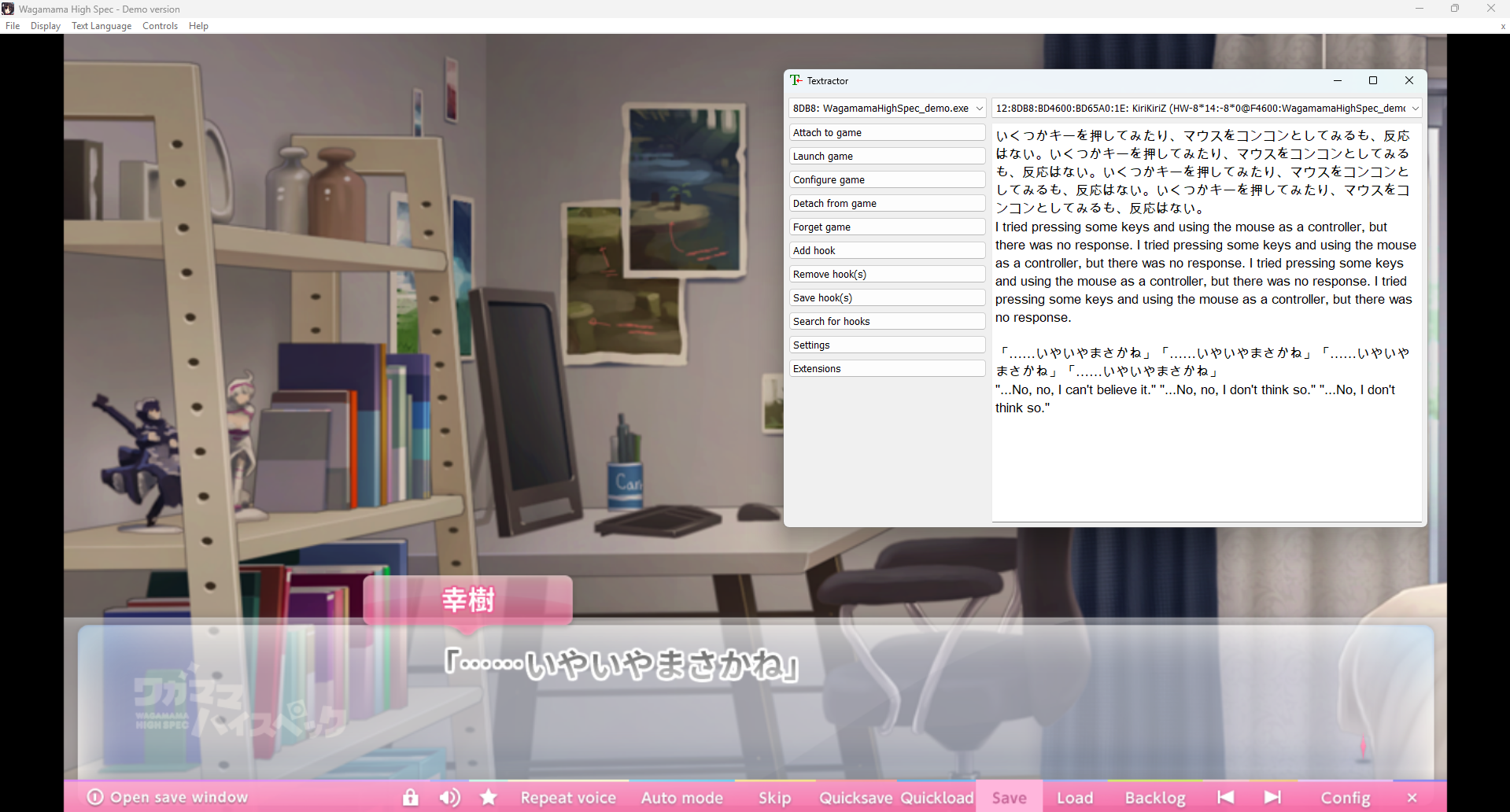
Textractor is a Windows text hooker for games and visual novels. Instead of reading pixels from the screen, it attaches to the running game process and tries to capture text before or while the game draws it. When that works, the output can be cleaner than OCR because it is not affected by font size, transparent dialogue boxes, or background art.
That makes Textractor strong for supported VN engines and games where auto-hooking finds the right text thread. It can also use hook codes, including many AGTH-style /H codes, and can search for possible hooks when automatic detection is not enough. If you already understand hook selection, extensions, and duplicate-line filtering, Textractor can be a powerful setup.
- Good for compatible visual novels that expose clean text hooks
- Can capture raw dialogue text before it is rendered on screen
- Useful for readers who understand hook codes, thread selection, and extensions
- Can work well with external machine translation workflows
Where Textractor Struggles
The hard part is that hooking depends on how the game outputs text. Visual novels use different engines, wrappers, custom UI layers, and release-specific builds. A hook that works for one version may fail on another, and a storefront update can change the executable enough to break an old setup.
Even when Textractor attaches, you may still need to choose the right thread, filter repeated output, handle names separately, or ignore garbage text. It can also miss visible text that is not exposed through the hook: choices, menus, settings, launcher text, image-based text, and stylized UI.
If your main problem is avoiding game file changes and fragile setup, the related guide on how to translate visual novels without a patch explains the no-modification workflow in more detail.
Common Textractor Problems Where OCR Helps
Textractor is worth trying first for many classic Japanese visual novels, but the moment you spend more time debugging capture than reading, OCR becomes the practical fallback. These are the situations where an OCR translator can save the session instead of replacing your whole setup.
- No text appears after attaching Textractor to the game
- Multiple text threads appear and the correct dialogue thread is unclear
- The hook repeats the same line, captures backlog text, or outputs noisy fragments
- Character names, ruby text, or speaker labels appear separately from dialogue
- Choices, menus, settings screens, launcher text, or save/load UI are visible but not captured
- The VN uses image-rendered text, custom UI, protected executables, emulation, or an engine build that does not hook cleanly
What Visual Novel OCR Does Differently
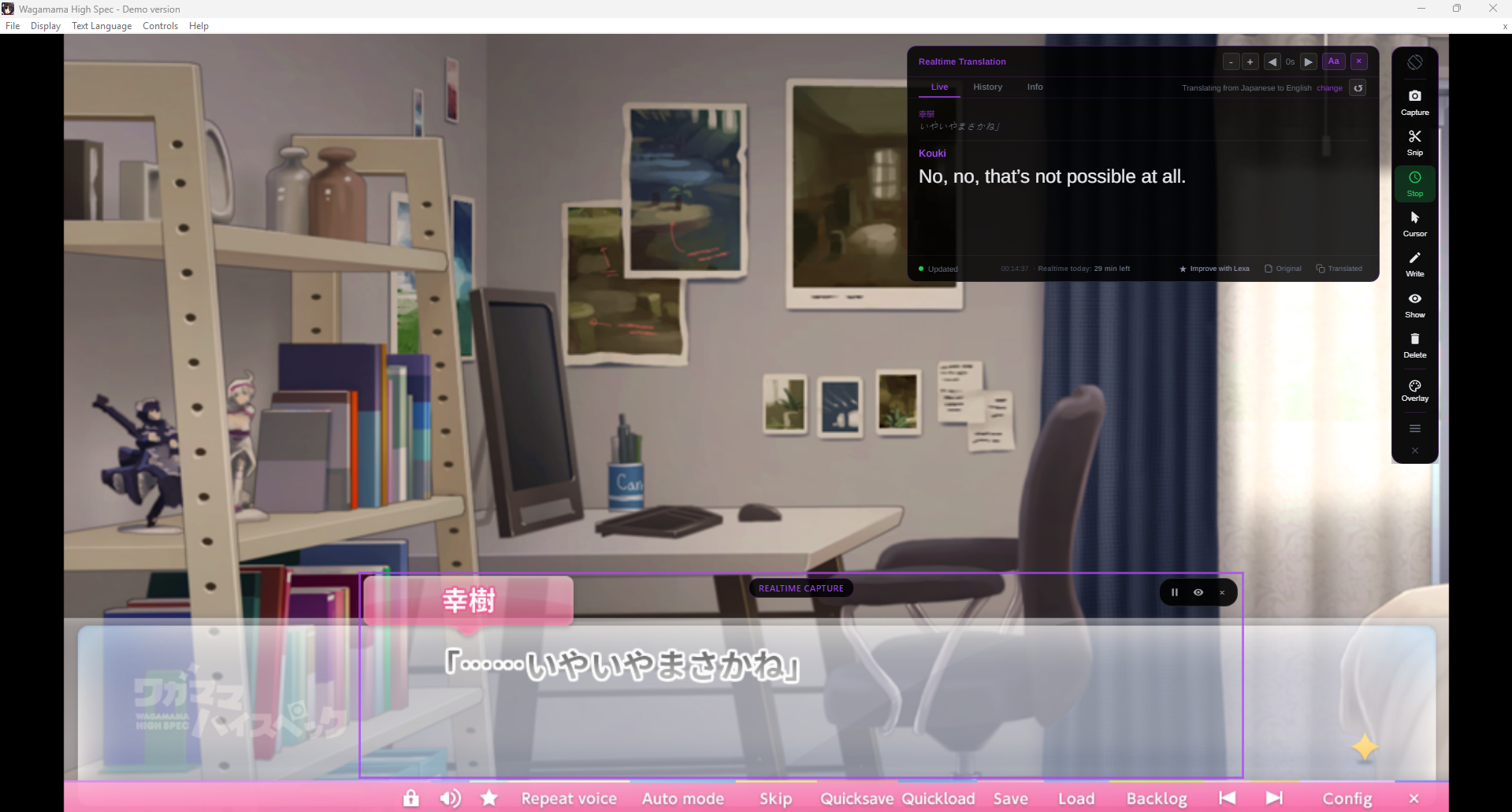
OCR translation starts from the screen. A VN OCR translator watches the selected dialogue area, recognizes the visible characters, and sends that text for translation. It does not need hook-code search, thread selection, process injection, a patch installer, or an engine-specific profile.
That makes OCR especially useful for Japanese visual novels where the text is readable but not easy to extract. If the dialogue box, choice menu, or UI label is visible, OCR has a chance to capture it. The tradeoff is different: OCR depends on text clarity, so tiny fonts, transparent boxes, heavy outlines, and noisy backgrounds can reduce accuracy.
For the full step-by-step workflow, read How to Translate Visual Novels with OCR on PC.
Textractor vs OCR Comparison
| Scenario | Textractor | OCR with Lexa | Best Choice |
|---|---|---|---|
| Supported VN with a clean text hook | Captures raw dialogue directly from the game process | Also works if the dialogue is readable on screen | Textractor |
| Unknown engine or unsupported game | May need hook-code search or manual troubleshooting | Reads visible text without engine-specific setup | OCR with Lexa |
| Choices and menus | May miss text that is not exposed through the hook | Can capture visible choices, menu labels, and UI text | OCR with Lexa |
| Image-rendered or stylized UI text | Often difficult if the text is not available as a hookable stream | Can work if the text is readable enough for OCR | OCR with Lexa |
| Duplicate lines or noisy hook output | May require thread selection, filters, or extension setup | Captures the selected screen area instead of all text threads | OCR with Lexa |
| Long reading session after setup works | Strong if the hook remains stable and readable | Strong if the capture area is stable and text is clear | Either |
| Fastest first test | Attach process, inspect threads, and choose output | Start Realtime and place its frame over the dialogue box | OCR with Lexa |
| Need exact extracted text | Better when the hook is clean | OCR may misread unclear fonts or backgrounds | Textractor |
When to Use Textractor
Use Textractor when the visual novel is known to hook cleanly, the text output is stable, and you do not mind configuring the tool per game. If you already have a reliable Textractor setup for a specific title, there is no reason to abandon it just because OCR exists.
Textractor is also worth trying when you want raw extracted text for a compatible game and you are comfortable debugging duplicate lines, wrong hooks, missing names, or engine-specific behavior. It is strongest as a power-user tool for games where the hook is already known or easy to find.
When OCR Is the Better Textractor Alternative
OCR is the better Textractor alternative when the problem is not translation quality but capture reliability. If the VN text is visible on screen but Textractor gives no usable output, OCR lets you keep reading instead of searching forums for hook codes or testing every thread.
This is especially important for a visual novel translator for PC because a real reading session includes more than dialogue. You still need to understand choices, menus, save screens, settings, launcher warnings, route prompts, and occasional image text.
When to Use OCR with Lexa
Use OCR with Lexa when you want a faster start, when Textractor does not capture the game cleanly, or when the visual novel has visible text that a hooker misses. This includes choices, menus, save screens, launcher windows, narration boxes, and image-rendered text.
Lexa is built for the gameplay moment: open the visual novel, turn on Realtime from the Lexa toolbar, place its frame over the dialogue box, and read while the translation updates. For choices and menus outside the text box, Cursor mode translates just the text you drag a box around. It is designed as a VN translator download for Windows for readers who want fewer per-game setup problems.
Best Workflow for Japanese Visual Novels
A practical workflow is simple: try the method that matches the game in front of you. If a complete English patch exists for your exact release, that may be the most polished reading experience. If you prefer text hooking and the game supports it, Textractor can work well. If the hook fails or the VN has important visible UI outside the hook, switch to OCR.
For most readers, OCR is the better universal fallback because it follows what is visible instead of depending on how the visual novel stores text internally. That is especially helpful across KiriKiri, Ren'Py, Unity, TyranoScript, RPG Maker, older engines, emulated games, and small doujin releases.
If you are still comparing tools, the broader best VN translator guide explains how OCR, patches, hookers, and manual translation fit together.
If you already know you want screen-based OCR, start with the dedicated guide on how to translate visual novels with OCR on PC. If your search is broader, compare the full visual novel translator workflow before choosing a setup.
FAQ
Is OCR better than Textractor?
Not always. Textractor can be better when it hooks a visual novel cleanly. OCR is better when hooks fail, setup takes too long, or you need to translate visible UI that Textractor does not capture.
Can Lexa work as a Textractor alternative?
Yes. Lexa can work as a Textractor alternative when you want OCR screen translation instead of text hooking. It is most useful when Textractor cannot find the right hook, captures noisy text, or misses choices and menus.
Why does Textractor show repeated or wrong text?
Textractor may expose multiple text threads from the same game. Some threads contain backlog text, repeated output, UI fragments, or internal strings instead of the current dialogue line. Choosing the right thread or filtering output is part of the setup.
Does OCR need Textractor hook codes?
No. OCR screen translation reads the selected area of your screen, so it does not need hook codes, process injection, script extraction, or game file changes.
Can OCR translate menus and choices that Textractor misses?
Yes, if the menu or choice text is visible and readable in the selected capture area. This is one of the main advantages of OCR over hook-only workflows.
Should I use both Textractor and OCR for visual novels?
That is often the most flexible setup. Use Textractor for games where it works cleanly, and keep OCR available for unsupported titles, menus, choices, launchers, and scenes where text hooking misses something important.
Is Textractor still worth using?
Yes. Textractor is still worth using for compatible visual novels where the hook is clean and stable. OCR is not a replacement for every power-user text-hooking workflow; it is the easier fallback when the visible VN text matters more than raw extraction.
Translate Visual Novels Without Patches
Lexa reads the dialogue box and translates each line while you play. No hook setup, no patch hunting, no game file changes.